




Your archives page is a great deal for anyone who visits your website. If a new visitor arrives through a search and if he/she is confused on what your site is about then he/she will most likely hit the “About” and the “Archives” pages. So it is highly important that you pay attention to optimize those pages for pleasant user experience and to increase the reader engagement of your blog.
Apart from pleasing your readers, you have got to please the search engine bots. And you “Archives” page has to be optimized well for the same sake. The default Archives page from the Thesis template is search engine optimized by itself, and it is fine. But if you want to customize it a bit and add some spice then read on.

I assume that you know how to create your archives page in the first place. If not, here is a quick shot- Login to your WP admin panel - on the left side bar under “Pages” select “Add New” - Give a title “Archives” - On the right side panel under “Page Attributes” -> “Template”, select “Archives”. Hit Publish, you should have the default Archives page.
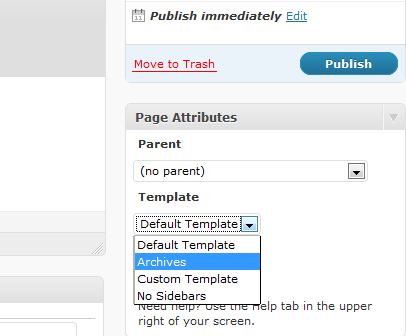
Now on to customizing:
Note: Make all changes to custom_functions.php and custom.css ONLY through a ftp access. Do not modify your files from the WP Dashboard editor. I use Firefox’s FireFTP addon for this purpose.
Paste the following code in your custom_functions.php file:
function my_archive() {
?>
<div>
<div>
<h3>By Category:</h3>
<ul>
<?php wp_list_categories(‘sort_column=name&title_li=’); ?>
</ul>
<h3>By Month:</h3>
<ul>
<?php wp_get_archives(‘type=monthly’); ?>
</ul>
<h3>By Tag:</h3>
<ul>
<?php wp_tag_cloud(‘number=80′)?>
</ul>
</div>
<div>
<h3>By Post: (Last 50 articles)</h3>
<ul>
<?php wp_get_archives(‘type=postbypost&limit=50′); ?>
</ul>
</div>
</div>
<?php
}
remove_action(‘thesis_hook_archives_template’, ‘thesis_archives_template’);
add_action(‘thesis_hook_archives_template’, ‘my_archive’);
The code for the tag archives <?php wp_tag_cloud(‘number=80′)?> will display all the tags if you set number=0. This means unlimited. However if you have too many tags, then you can set some number; for instance I have set 80 here.
Similarly you can choose the number of posts to be displayed under “By Post” category. I have given 50 posts here for illustration.
For the styling part, you need to paste the following code in your custom.css file:
/*—-custom archive—-*/
.custom .archive h3 {margin-top: 0;}
.custom .archive ul {font-size: .95em; }
.custom .archive1 { float: left; width: 40%;}
.custom .archiver { float: right; width: 60%;}
With this code you will have an archive page similar to the one at Find All Answers. I just don’t use the Monthly archives.
If you want to change font size, you can do so by editing the code for custom.css.
Let me know if you have any trouble in using the code. Leave a link to your archives page in the comments, I’ll be glad to check your spiced up archives page.
What? You haven’t got Thesis Theme yet? Click here to get this rocking theme and rock the Blogosphere! Find All Answers runs on this Awesome Theme.
Image credit
|
|

Article by JaneSheeba
+Jane is the founder of Problogging Success. She is an expert blogger, consultant, freelance writer and blog designer. Don't forget to get your hands on two FREE Ebooks she offers.
Jane has written 263 awesome posts for Problogging Success.










{ 12 comments… read them below or add one }
I can’t find any option of “Template” in add new pages
Saket Jajodia recently posted..See Historical Images And Places In Google Earth
Hi Saket make sure your theme supports/has default templates for static pages. Google with the name of your theme to find out.
Jane.
Jane Sheeba recently posted..How to Add a Custom Favicon to your WordPress or Blogger Blog
Thank you very much for this piece of help i have done this just as you wrote and it works really.
Thanks!
Hi Jagan, glad that you made it work. The archives page at thewebtricks looks cool. Congrats.
Jane.
Thanks.
Write some more thesis help articles……
Sure Jagan. More are on the way already.
when I post this code into custom_functions.php file… my site gives error 500
not working.
Musthafa recently posted..The Ultimate SEO Tips And Tricks For Your Website
Are you using the latest version of Thesis?
yes, am using 1.8, you can check my blog, i have done some customization by myself and it looks good. Footer and sidebar etc. Can you provide me help on ‘header customization?’, any designs, welcome..
Regards
Pythonskynet
Money Blogger recently posted..The Ultimate SEO Tips And Tricks For Your Website
Hi Musthafa,
Yes, visited your site and your customizations look cool. I am currently having a couple of big Thesis design paid projects; Just send me what things you want me to customize on your blog via the contact form. For Thesis, I do “custom” customizations - check out this page for more details:
http://www.findallanswers.com/design-elements-thesis-wordpress-blogs/
Cheers,
Jane.
Jane Sheeba recently posted..Why should you install Commentluv on your blog
Even though I am not using word press your post seems to be very useful. Earlier I used word press, but later moved away from it.
Good post and nice share for all the blogging lovers.
Blogging widgets recently posted..Remove Blogger Nav bar Completely
I have been using wordpress for a long time and I could say that these are some of the things that are very useful in the improvement of the websites that are setup.
{ 7 trackbacks }