
List building is one of the most important parts of successful blogging. Building an email list is not rocket science, as you may think of. You need not postpone it until you become “popular”.
That’s the mistake most people do anyway - They either think that building a list is not for newbies, or they are quite tight on a budget to try out professional email autoresponders like Aweber.
Since email marketing is one of the most powerful ways to market your content/product/service etc. and since “the money is in the list” you must start building an email list from day 1. Period.
Of course you may not be initially getting thousands of subscribers; in fact getting your first 100 is the most challenging phase.
One of the most popular (and the topper) in the list of list building tools and email marketing software is Aweber. Although Mailchimp is having a “free option” to go with, you will soon find out which you want to choose based on your business needs.
To help you with the differences in the services offered by Aweber and Mailchimp, I’ve written the following post:
Aweber Vs Mailchimp: Email Autoresponder Face-off
Now let’s get into the business of this post.
How cool will it be to know EXACTLY which of your web forms get you how many subscriptions. Even more precisely, which forms get your how many visitors AND from what pages?
Do you get what I mean? Take a look at my various Aweber forms I’m using and the stats offered by Aweber
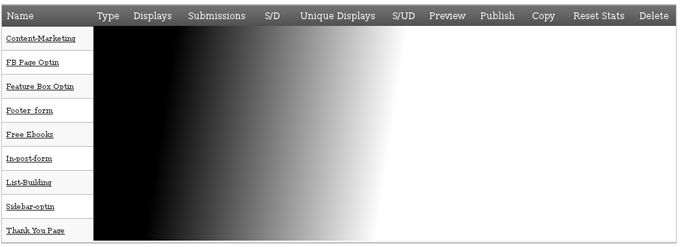
Let me give some details about the important factors here
Displays - tells you how many times a particular form has been displayed.
Submissions - tells you how many people have subscribed to your list through that form.
S/D - Submission to Display ratio - tells you the conversion rate of your form; that is, out of 100 views of that form how many actual submissions did the form get.
Unique displays - tells you the number of people who saw that particular form, instead of the number of page views (and hence the number of views). It just counts one view per person/ip.
S/UD - the precise Aweber conversion rate.
Now I EXACTLY know which forms give me great conversions. My top conversion rates are as follows:
- The Aweber form at my Free Ebooks page is the topper with a 30% conversion rate.
- Second comes the Aweber form at the feature box, which is displayed only on the home page; the conversion rate is 16.9%, not too shabby for just the home page display.
- The third position goes to my side bar optin form which you see at the top of my sidebar on all the pages, the conversion rate is 9%.
And all the other forms follow.
To me this is a great deal. I exactly know the hot spots that give me more conversion. I exactly know which designs, color combinations, positions attract people to subscribe.
For instance the feature box optin form is so prominent at the top of the homepage that it can’t be missed. The sidebar optin converts well because (may be) the color is eye-catching and it is above the fold as well. The free Ebooks page tops because well…. it is a page dedicated to explain what my free ebooks are about. That’s attractive to the readers as well.
Can Aweber give me more?
Now, although watching which of the Aweber forms contribute well for your list building results is great, there’s still something missing. What if I want to know the list of people who subscribed by being interested on the content at THAT page?
For instance I have an Aweber after-post optin form on all post pages. So the information about the conversion of that particular Aweber web form is not of great use to me. I would like to know which page or post content was so powerful that made subscribers to make them submit their email.
So when I write a killer post or a pillar content, I would like to know how much visitors is converted from that page into subscribers. I cannot do this with a form statistic because the same form is present in more than one pages; for instance the after-post form as I mentioned earlier and the sidebar Aweber optin form are present in all pages/posts.
With Aweber’s search subscriber option, I can exactly know the list of subscribers who joined from a particular page. See the image below.
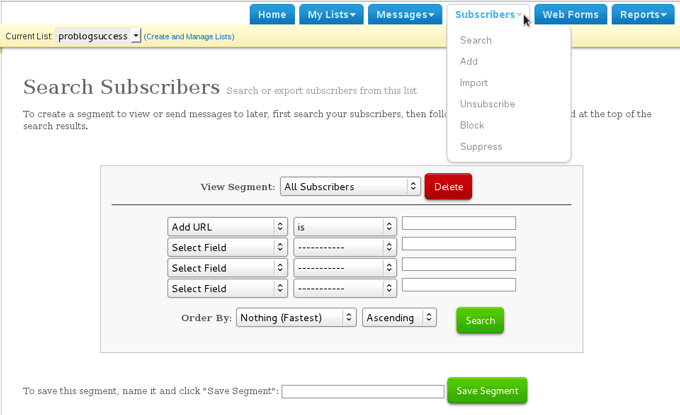
Just as shown above, go to Subscribers and click Search. You’ll see the above screen. If you select the parameters “ADD URL” and “is” and then enter the url of the page you want to know, you’ll get the list of all the subscribers who submitted their email from that page.
Even more precisely you can pin point the page and the Aweber form at that page by using one more parameter “adtracking” as shown below.
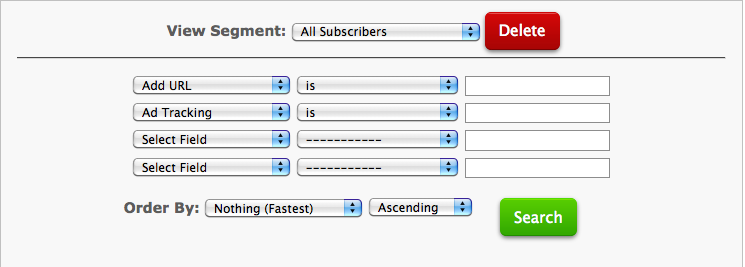
Now, I know the visitors that came through a particular Aweber form from a particular page. This helps me improving on my forms (design, visibility etc.) and at the same time I come to know which type of content is converting well on my readers.
Aweber tracking: Takeaway
The money is in the list. If your ultimate aim is to make money blogging, then you should be building an email list. Now methods just don’t work; you need to get feedback.
You need to stop, think, reconsider and improvise on your list building efforts on a regular basis. And what I shared here is just the tip of the iceberg; one of the many things that you should be knowing on your progress with list building.
Try Aweber for 1 month for $1 and you won’t regret it!
How do you track and “analyze” your list building efforts? Please share your thoughts in the comments.




