You might be fed up with your online results. You might be too busy and have no time to focus on customer satisfaction levels, to find the reason as to why a visitor leaves your site abruptly and to find ways to optimize conversions.
‘Live chat robot’ is a new wordpress bot which comes handy for your online marketing campaigns. The intelligent bot offers number of benefits. Some benefits are general and some are targeted for specific purposes.
As a robot, the bot can be trained and engaged in a specific assignment. The WordPress plugin can be used free of cost as long as you are not planning to sell through online channels.
The plug-in can be downloaded at http://wordpress.org/extend/plugins/acobot/. Let us explore more about this wonder plug-in.
Major benefits
- The bot can be trained to receive comments from the audience
- You will be able to learn the interests of your visitors
- You can use the bot without any limit
- It is simple and easy as it won’t require your coding skills.
- It is easy to sign up, install the plug-in, configure and deploy on your website.
- The account is free. You can upgrade your account and downgrade your account at any point of time. You can completely root out your account by cancelling as well.
- The live chat robot will chat with users and convert potential users into clients.
- You can launch demo robot on your website to check the performance.
- You should understand the limitation of the robot as it can be deployed only on sites that speak English.
3 steps
Live chat robot boasts of improving your customer base in three easy steps.
- The first step is signing up for the account. The account can be created in few seconds time. You are not required to pay any amount as it is free.
- The second step is training your robot. Training period can be told as incubation period during which you will mold the robot as per your requirements.
- The third step is positioning the live chat robot on the website. You can install the robot and configure it for the real work in less than three minutes. You are not required to tinker the code to bring the desired functionality.
Advantages
- You will not depend on live team which cuts down your overheads
- You can extend support on a 24 x 7 basis
- No more waiting for replies. A visitor or prospective customer will get the response immediately as the query will be processed instantaneously.
- No more burden to deal with offline messages as there will be no pending workload at any point of time.
- The robot delivers short and crisp answers (much preferred than links which contain bundles of lines of text)
- As you cut down wait times and improve response rates, you have ample chance to win customers.
Analyzing the facts
Live chat robot delivers power by giving you the capacity to understand your customers. Most importantly, you can analyze the facts in a better way than you would have performed through conducting an online survey.
You can check the following benefits. This will give you ample room to improve the robot, your website and the entire business model itself to get the maximum from your business venture.
- You will be able to understand the real requirements of your prospective customers.
- You can understand under what circumstances the visitors landed on your site.
- You can understand why they need the products that you are offering.
- You can also understand why they are not purchasing products from you.
How to train your robot
Even though training ‘Live chat robot’ is not difficult, you should spend time and effort to make it respond in a better way. Training your robot is easy and simple.
As output is directly proportional to the input, the efficiency of your robot on a live platform depends on the level of inputs given by you.
You should login to the site, http://acobot.com to start a live chat session.
As you pose a question, the robot will hit back with a reply.
If you are not satisfied with the reply, you can type “>>” (without quotes) which informs the robot to answer in a better way.
You can train your robot until you expect decent performance from it.
Once you are satisfied with the performance, you can install the robot on the website.
You can access chat log, review the answers and enter better replies to improve the performance of your robot’s live chat.
You can customize the chat robot. Although you can change the name, gender and age, it is not required to meddle with the same as it will not impact its performance.
Although your robot can deal with complex queries, it is advised to keep it simple and short (KISS) as most web users want to communicate in simple language and expect short and straight answers.
While training the robot you can avoid the repetition of queries of similar nature.
Live chat robot cannot be compared with SIRI – the voice application used in iOS based devices. SIRI can process voice commands whereas live chat robot can process text commands only.
If SIRI cannot find answers to a particular question, it will try all means including an extensive web search. Such kind of facility is not available with live chat robots. You are required to train up everything to get better answers from the robot.
How to install
In order to install the ‘Live Chat Robot’ on your site, you should login to the acobot website. Click on Install present in the main menu. You should copy the JavaScript code that is appropriate to your site.
The code should be embedded beneath the body tag on every web page where you wish to find the presence of the ‘Robot’.
You are free from worries that page loading time will decrease by installing the robot on your site as the code is optimized on a regular basis by acobot team.
You can expect support from Acobot until JavaScript is properly embedded on your website. Acobot runs on many different platforms with the exception of hosted WordPress sites.
How to push a webpage
Pushing a webpage is considered as a proactive measure by Acobot. When a customer asks for information, the related web page will load automatically without the burden of clicking on the link by the visitor.
Acobot records links that you would like to push to the customer based on the chat. It is estimated that you can expect an increase in customer conversion by 10 to 20% by utilizing the push option.
API
JavaScript API allows you to pass your customers’ information to the Acobot robot. You should add the following code just beneath the main code:
Here, variables can be any of the customer’s details like email ID, name, user ID, phone number, gender, age and location. The value represents the actual value of each property (variable).
Importance of knowledge meter
The knowledge meter lets you track the performance of your robot. You will be able to measure the level of training extended to the robot so far and how much more you would like to impart in the future.
You can estimate the preparedness of your robot to be deployed on your website.
The number displayed at the bottom right hand corner of the chat log page will let you know the number of good replies delivered by your robot.
You can launch your robot confidently if it can deliver at least 90 good replies.
Even though this is the rough number provided by the Acobot team, you are advised to train up your robot and should impart customized training until you get confidence that it can deliver goods to take forward your business.
Various plans
Free plan will cost you nothing as the plan name suggests. There is no restriction on availing the features offered by the plug-in.
While there is no limitation on number of non-business chats there is a restriction on the number of business chats. You can avail a maximum of 30 business chats per month.
Pro 200 plan can be subscribed at $29 per month. In addition to the access to full features, you can enjoy the freedom from Acobot branding. The numbers of business chats that can be availed per month are 200.
Pro 400 plan is similar to the Pro 200 plan with the exception of subscription price of $49 per month and the availability of a maximum of 400 business chats per month.
There are special plans for websites which attract a high volume of visitors. RPO 1000 offers 1000 business chats per month at a subscription price of $99 per month.
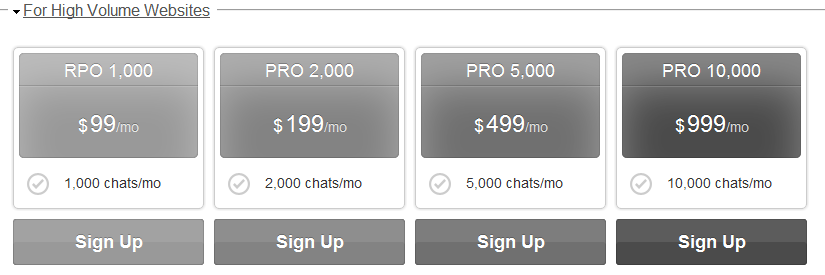
PRO 2000 offers 2000 business chats per month at a subscription price of $199 per month. PRO 5000 offers 5000 business chats per month at a subscription price of $499 per month.
PRO 10000 offers 10000 business chats per month at a subscription price of $999 per month.
Takeaway
Live chat robot is a worthy application. By deploying the live chat on your website, you can eliminate the cost incurred towards the engagement of support personnel.
You can train up the robot with questions that are anticipated from customers. In this way, all the frequently asked queries can be handled by the robot without any difficulty.
By checking the log, you can update and train the robot to handle new and difficult queries. In this way, you can enhance the presence of the robot to deliver the goods in replying with smart answers.
The customers will get short and simple answers instantly. As there is no lag time in conveying the information required for the customer, the customer engagement will be taken to new heights which will lead to conversion of queries into sales at a rapid pace.
Disclaimer: Please note that this is a paid review which means I either get monetary or non monetary benefits to write this review. However that doesn’t change any fact in this review. This review is purely based on my personal opinion and is as unbiased as possible.





saad naeem says
ok , i see they are offering a free version of it , i think i am gonna use it on one of my services site to see how it works out and if i like it , I will come and write a review about it .
Thanks Jane.
Jane Every time I read your article I learn something new Thanks
Abhijit says
I think this will help us to get more clients for our business. Works like a support stuff. Cool..
Will try this with free version…
Thanks Jane for sharing this cool plugin,
Abhijit…
This is something new to me. I use live chat program for my webhosting website but for this i have to remain online 24/7 but this bot seems to have solve this issue. Definitely gong to try this jane.
Sara says
This looks really handy! I’m going to explore the use of this live chat robot. Thanks for sharing this!
The idea of using a live chat robot is certainly a good one to explore.It will not only reduce the overheads but as the responses to the clients would be quick, will also help in getting good business.Training the bot would be yet another task.
As it is also offered free,so for a newbie it is a worthy application to try for.
thanks for sharing!
Hey there!!
Live Chat Robot seems impressive but if you could give me an example of some websites which have enabled the bot on their website it could solve the other small doubts that are ringing in my head. I appreciate you for sharing this plugin with the world. If I remember well, I saw this live robot on a hospital website. Now it seems that it is removed. I really want to see a website with this feature. Please help me.
Thanks!
Lakshmi, Acobot is currently chatting on over 22,301 web pages at this moment. Sorry but we cannot provide the list of the websites because the owners, especially the paid ones, often get very unhappy with the test chats. I recommend you go to http://acobot.com to try it out.
Yeah, I agree to Lakshmi. The more we see it, the more we will be impressed! And could it be possible that your website will called a SPAM if you used this kind of plug-in?
Is it just for WordPress.org ?
Can I use it with WordPress.com?
Or any other website hosting ?
Doaa, Acobot cannot be used with wordpress.com because they don’t allow JavaScript code. However you can use it with virtually any other platforms, including Joomla and Drupal. Cheers!
Pulkit says
I tried its demo version just now and it is best for use. Thanks for sharing
Live chat robot is an interesting idea and I consider it can lead more clients for the business. In addition, it can be a wonderful tool for businesses and customers alike.
No doubt live chat plugins are very helpful in increasing sale ratio your article is informative for newbies. I am going to try their free version. Thank you.