
Find out how you can get Commentluv Premium at a discount - Click here!
I love Commentluv. I have been using it since when I knew about it and it is one of the awesome plugins; I wouldn’t be blogging without it.
It is one of a kind plugin that helps a blogger to reward their commenters who comment at the blogger’s blog and at the same time help a blogger to receive high quality do-follow backlinks from commentluv enabled blogs.
Indeed link building has taken a new form and has become much easier due to commentluv.
I have written a couple of posts about the features of the plugin and how it makes your blog a very good space for discussion by providing SEO benefits for your commenters:
Why should you install Commentluv on your blog, and
Commentluv: Getting better, more love and a contest to win (the contest is outdated now).
That is not all - Here’s the premium plugin, and me, one of the beta testers
Andy has been working on a premium version of commentluv; I knew about it as he tweets about it occasionally. But I never thought that I would be invited to apply and also be selected as one of the beta testers for the premium plugin.
That was a surprise and I got a great chance to put my hands on the premium plugin before it was/is released.

Lots of love ….
Now that I’ve put my hands on the plugin, I give you the details about installation and features of this plugin to assist you with using the plugin.
Installation and basics of Commentluv Premium:
Installing commentluv premium is just like installing any other WordPress plugin. When you purchase Commentluv premium, you will get a .zip file of the plugin files. You have to go to your WordPress dash and click on Add New under Plugins. You have to then select the plugin .zip file and click upload.
8-in-1 - Lot less load for your site!
But hang on - you should deactivate (and optionally delete) the following plugins before installing and activating commentluv premium.
1. GASP
2. KeywordLuv
3. Twitterlink Comments
4. Free commentluv
5. Trackback validation plugin
6. Do follow plugin (no follow free or any others)
7. Top commentators widget (top commenluvvers)
8. No Self Ping
Why? Because commentluv premium has all these plugins integrated to itself.
This means that you can drop 8 plugins from your WordPress blog for one plugin - Commentluv premium. This is great for your blog’s speed and in general.
Once you install and activate commenluv premium you will get a notification to enter the commentluv.com username and password. You need to enter them in order to activate and use the plugin.
Once activated you will get the following settings screen:

Click to enlarge…..
As you can see, there are individual settings options for 4 plugins in there. Let’s see the features one by one.
Commentluv premium features
There are a set of primary and appearance settings which are pretty basic. Here is a screenshot of how I have configured them

Click to enlarge
Note that I have not ticked “Show registration message”. This feature shows a message to the users that they will be given 10 recent posts of theirs to choose from if they register at my site. This is one of the features of the free commentluv plugin.
You can read more about this feature and see some screens in this post:
Commentluv: Getting better, more love and a contest to win
Now I am not using this feature because I’ve got something really shiny. See below.
Not just comment luv but social media love as well
Now instead of asking my commenters to register at my site to get to show 10 latest posts, I can ask them to share some social love with me.
This is an awesome feature of Commentluv Premium that integrates social sharing (in a genius way).

Click to enlarge…
With these options you can choose whom to give 10 posts and do follow. For instance, I have opted to give 10 posts for those who are either logged in or has 3 approved comments or has given a +1 to the post on Google plus.
I can also tap the power of Twitter and Facebook share and also increase my Twitter following using Commentluv Premium.

Click to enlarge….
As you can see, you can also give 10 posts to people who tweets your posts and/or likes it on Facebook. Key in your twitter username to get more followers.
Choose what you show when you comment on Commentluv enabled blogs
So it is not all about giving. It is about receiving the love too. So when you comment on commentluv enabled blogs, you used to either leave a link to your latest post or a link to one of the 10 recent posts (depending upon the settings in the blog you comment).
Now if you’re a Commentluv premium user, you can override this and choose up to 5 favourite posts or pages to show in the list to choose from. Just make sure you don’t choose the “Contact” page LOL.

Click to enlarge
You also have the awesome option to show your short bio when someone hovers over your commentluv link (it also says that you’re a Commentluv premium user). This is great for branding!
Twitterlink Settings
Twitterlink is an integrated feature in Commentluv premium that allows a blogger to offer the commenter a field to enter his/her twitter username. When the comment is published, the commenter’s twitter profile is also visible leading to good exposure for the commenter.

Click to enlarge
There are three options to include twitter links. If the first option 3-Theme or Legacy doesn’t work you need to choose the second option.
The first option doesn’t work with Thesis theme and hence I have chosen the second option.
If you are a geek you can choose the third option and add the twitterlink field yourself.
GASP settings
GASP (Growmap Anti Spambot Plugin) is a plugin that keeps comments from spam bots right off the bat. If you want to know more about the GASP (standalone) plugin read this post
AKISMET out GASP in
The integrated version of GASP in Commentluv Premium has the option to blacklist spam (apart from the usual GASP feature). The screen better explains it.
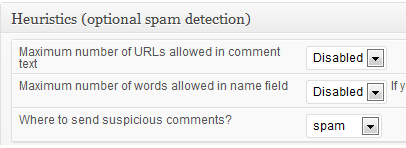
In addition, the trackback validation feature has various options to set up for better spam free experience.

Click to enlarge….
Keyword Name Settings
Keyword name - the keywordluv feature (name changed) of Commentluv Premium enables the commenter to use keyword as anchor text for the link they leave in “Website field”. Normally if keywordluv is not enabled the name of the commenter acts as the anchor text.
Due to this, many commenters tend not to put their name and put a keyword in the name column, thus making the comment look ugly and spammy.
Keywordluv feature helps the commenter use their real name and at the same time use a keyword as an anchor text for their link. Andy’s version of keywordluv is keyword name.
You can choose to “Allow” or “Deny” this feature to enable or disable keyword names, respectively.
You can set the minimum number of approved comments a commenter should have in order to be able to use this feature. You can also set the maximum number of keywords to be used.
Commentluv Premium features
The features I so far discussed are available also in the free version of Commentluv plugin. But let me discuss some premium-only features!
Takeaway
All in all, I love commentluv premium for its genius features. This plugin is a winner in all aspects. I couldn’t miss the genius features and I’m so lucky to be a beta tester of the plugin.
Now that I have touched and tried the plugin, I highly recommend it for any blogger because a commentluv enabled blog is a magnet that attracts a lot of commenters which makes your blog a great platform.
The commentluv premium plugin’s awesome features also help you to make the most out of your blog comments on commentluv enabled blogs.




